# Nougat
## 概述
Nougat 模型由 Lukas Blecher、Guillem Cucurull、Thomas Scialom 和 Robert Stojnic 在 [Nougat: Neural Optical Understanding for Academic Documents](https://huggingface.co/papers/2308.13418) 中提出。Nougat 采用与 [Donut](donut) 相同的架构,即使用图像 Transformer 编码器和自回归文本 Transformer 解码器,将科学 PDF 转换为 markdown,从而更轻松地访问这些文档。
该论文的摘要如下:
*科学知识主要存储在书籍和科学期刊中,通常以 PDF 形式呈现。然而,PDF 格式会导致语义信息的丢失,尤其是在数学表达式方面。我们提出了 Nougat(Neural Optical Understanding for Academic Documents),这是一种视觉 Transformer 模型,执行光学字符识别(OCR)任务,将科学文档处理为标记语言,并在新构建的科学文档数据集上展示了该模型的有效性。所提出的方法通过弥合人类可读文档与机器可读文本之间的差距,为提升数字时代科学知识的可访问性提供了一条有前景的解决方案。我们发布了模型和代码,以加速未来在科学文本识别方面的工作。*
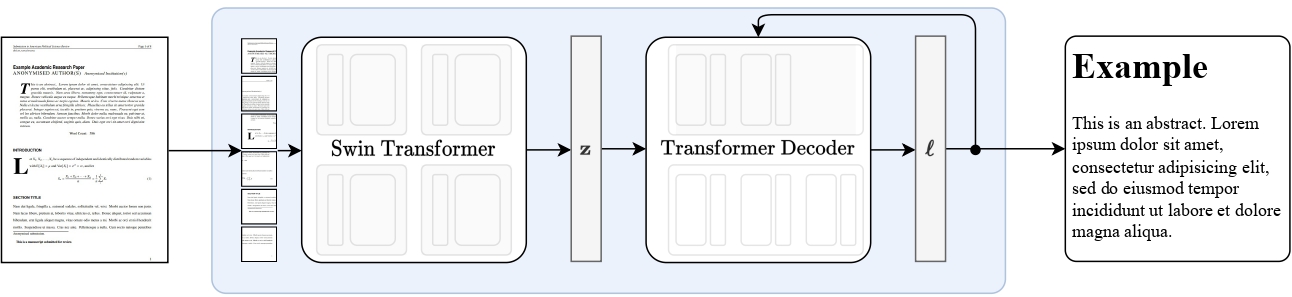 Nougat 高层概览。摘自原始论文。
该模型由 [nielsr](https://huggingface.co/nielsr) 贡献。原始代码可在[此处](https://github.com/facebookresearch/nougat)找到。
## 使用技巧
- 快速上手 Nougat 的方法是查看[教程笔记本](https://github.com/NielsRogge/Transformers-Tutorials/tree/master/Nougat),其中展示了如何在推理时使用该模型,以及如何在自定义数据上进行微调。
- Nougat 始终在 [VisionEncoderDecoder](vision-encoder-decoder) 框架内使用。在架构方面,该模型与 [Donut](donut) 完全相同。
## 推理
Nougat 的 `VisionEncoderDecoder` 模型接受图像作为输入,并利用 [generate()](/docs/transformers/main/zh/main_classes/text_generation#transformers.GenerationMixin.generate) 根据输入图像自回归地生成文本。
[NougatImageProcessor](/docs/transformers/main/zh/model_doc/nougat#transformers.NougatImageProcessor) 类负责预处理输入图像,[NougatTokenizerFast](/docs/transformers/main/zh/model_doc/nougat#transformers.NougatTokenizer) 将生成的目标 token 解码为目标字符串。[NougatProcessor](/docs/transformers/main/zh/model_doc/nougat#transformers.NougatProcessor) 将 [NougatImageProcessor](/docs/transformers/main/zh/model_doc/nougat#transformers.NougatImageProcessor) 和 [NougatTokenizerFast](/docs/transformers/main/zh/model_doc/nougat#transformers.NougatTokenizer) 类封装为单个实例,以同时提取输入特征并解码预测的 token id。
- 逐步 PDF 转录
```python
from huggingface_hub import hf_hub_download
from PIL import Image
from transformers import AutoModelForImageTextToText, NougatProcessor
processor = NougatProcessor.from_pretrained("facebook/nougat-base")
model = AutoModelForImageTextToText.from_pretrained("facebook/nougat-base", device_map="auto")
model.to(model.device) # doctest: +IGNORE_RESULT
# prepare PDF image for the model
filepath = hf_hub_download(repo_id="hf-internal-testing/fixtures_docvqa", filename="nougat_paper.png", repo_type="dataset")
image = Image.open(filepath)
pixel_values = processor(image, return_tensors="pt").to(model.device).pixel_values
# generate transcription (here we only generate 30 tokens)
outputs = model.generate(
pixel_values.to(model.device),
min_length=1,
max_new_tokens=30,
bad_words_ids=[[processor.tokenizer.unk_token_id]],
)
sequence = processor.batch_decode(outputs, skip_special_tokens=True)[0]
sequence = processor.post_process_generation(sequence, fix_markdown=False)
# note: we're using repr here such for the sake of printing the \n characters, feel free to just print the sequence
print(repr(sequence))
'\n\n# Nougat: Neural Optical Understanding for Academic Documents\n\n Lukas Blecher\n\nCorrespondence to: lblecher@'
```
请查看 [model hub](https://huggingface.co/models?filter=nougat) 以查找 Nougat 检查点。
该模型在架构上与 [Donut](donut) 完全相同。
## NougatConfig[[transformers.NougatConfig]]
#### transformers.NougatConfig[[transformers.NougatConfig]]
```python
transformers.NougatConfig(transformers_version: str | None = None, architectures: list[str] | None = None, output_hidden_states: bool | None = False, return_dict: bool | None = True, dtype: str | torch.dtype | None = None, chunk_size_feed_forward: int = 0, id2label: dict[int, str] | dict[str, str] | None = None, label2id: dict[str, int] | dict[str, str] | None = None, problem_type: Literal['regression', 'single_label_classification', 'multi_label_classification'] | None = None, is_encoder_decoder: bool = True, encoder: dict | transformers.configuration_utils.PreTrainedConfig | None = None, decoder: dict | transformers.configuration_utils.PreTrainedConfig | None = None)
```
[来源](https://github.com/huggingface/transformers/blob/main/src/transformers/models/nougat/configuration_nougat.py#L28)
**参数:**
is_encoder_decoder (`bool`,*可选*,默认为 `True`):模型是否用作编码器/解码器。
encoder (`Union[dict, ~configuration_utils.PreTrainedConfig]`,*可选*):编码器骨干网络的配置对象或字典。
decoder (`Union[dict, ~configuration_utils.PreTrainedConfig]`,*可选*):解码器骨干网络的配置对象或字典。
这是用于存储 NougatModel 配置的类。它根据指定的参数实例化 Nougat 模型,并定义模型架构。使用默认值实例化配置将得到与 [facebook/nougat-base](https://huggingface.co/facebook/nougat-base) 类似的配置。
配置对象继承自 [PreTrainedConfig](/docs/transformers/main/zh/main_classes/configuration#transformers.PreTrainedConfig),可用于控制模型输出。有关更多信息,请参阅 [PreTrainedConfig](/docs/transformers/main/zh/main_classes/configuration#transformers.PreTrainedConfig) 的文档。
示例:
```python
>>> from transformers import NougatConfig, VisionEncoderDecoderModel
>>> # Initializing a Nougat configuration
>>> config = NougatConfig()
>>> # Initializing a VisionEncoderDecoder model (with random weights) from a Nougat configurations
>>> model = VisionEncoderDecoderModel(config=config)
```
#### from_encoder_decoder_configs[[transformers.NougatConfig.from_encoder_decoder_configs]]
```python
from_encoder_decoder_configs(encoder_config: PreTrainedConfig, decoder_config: PreTrainedConfig, **kwargs)
```
[来源](https://github.com/huggingface/transformers/blob/main/src/transformers/models/nougat/configuration_nougat.py#L52)
**返回:** [VisionEncoderDecoderConfig](/docs/transformers/main/zh/model_doc/vision-encoder-decoder#transformers.VisionEncoderDecoderConfig)
配置对象的实例
从预训练的编码器模型配置和解码器模型配置实例化一个 [VisionEncoderDecoderConfig](/docs/transformers/main/zh/model_doc/vision-encoder-decoder#transformers.VisionEncoderDecoderConfig)(或其派生类)。
## NougatImageProcessor[[transformers.NougatImageProcessor]]
#### transformers.NougatImageProcessor[[transformers.NougatImageProcessor]]
```python
transformers.NougatImageProcessor(**kwargs: *)
```
[来源](https://github.com/huggingface/transformers/blob/main/src/transformers/models/nougat/image_processing_nougat.py#L57)
**参数:**
do_convert_rgb (`bool`, *kwargs*, *可选*) : 是否将图像转换为 RGB。
do_resize (`bool`, *kwargs*, *可选*, 默认为 `True`) : 是否调整图像大小。
size (`Annotated[int | list[int] | tuple[int, ...] | dict[str, int] | None, None]`, *kwargs*,默认为 `{'height' : 896, 'width': 672}`):描述输入到模型的最大尺寸。
default_to_square (`bool`,*kwargs*,*可选*,默认为 `True`):当 size 为整数时,是否在调整大小时默认使用正方形图像。
crop_size (`Annotated[int | list[int] | tuple[int, ...] | dict[str, int] | None, None]`, *kwargs*) : 应用 `center_crop` 后输出图像的尺寸。
resample (`Annotated[Union[int, PILImageResampling, NoneType], None]`, *kwargs*,默认为 `2`) : 如果调整图像大小,则使用的重采样滤波器。它可以是枚举 `PILImageResampling` 中的一个值。仅当 `do_resize` 设置为 `True` 时才会生效。
do_rescale (`bool`, *kwargs*, *可选*,默认为 `True`):是否对图像进行重新缩放。
rescale_factor (`float`, *kwargs*, *可选*,默认为 `0.00392156862745098`) : 当 `do_rescale` 设置为 `True` 时,用于对图像进行缩放的缩放因子。
do_normalize (`bool`,*kwargs*,*可选*,默认为 `True`):是否对图像进行归一化。
image_mean (`Union[float, list[float], tuple[float, ...]]`, *kwargs*, *可选*,默认为 `[0.485, 0.456, 0.406]`) : 用于归一化的图像均值。仅当 `do_normalize` 设置为 `True` 时生效。
image_std (`Union[float, list[float], tuple[float, ...]]`, *kwargs*, *可选*,默认为 `[0.229, 0.224, 0.225]`) : 用于归一化的图像标准差。仅当 `do_normalize` 设置为 `True` 时生效。
do_pad (`bool`, *kwargs*, *可选*,默认为 `True`) : 是否对图像进行填充。填充操作会将图像填充至批次中的最大尺寸,或填充至每张图像的固定正方形尺寸。具体的填充策略取决于模型。
pad_size (`Annotated[int | list[int] | tuple[int, ...] | dict[str, int] | None, None]`, *kwargs*) : 用于将图像填充到的尺寸,格式为 `{"height": int, "width" int}`。该尺寸必须大于预处理中提供的任何图像尺寸。如果未提供 `pad_size`,图像将被填充到批次中最大的高度和宽度。仅在 `do_pad=True.` 时应用。
do_center_crop (`bool`, *kwargs*, *可选*) : 是否对图像进行居中裁剪。
data_format (`Union[str, ~image_utils.ChannelDimension]`,*kwargs*,*可选*):仅支持 `ChannelDimension.FIRST`。为兼容旧版处理器而添加。
input_data_format (`Union[str, ~image_utils.ChannelDimension]`, *kwargs*, *可选*) : 输入图像的通道维度格式。如果未设置,则从输入图像中推断通道维度格式。可以是以下之一: - `"channels_first"` 或 `ChannelDimension.FIRST`:图像为 (num_channels, height, width) 格式。 - `"channels_last"` 或 `ChannelDimension.LAST`:图像为 (height, width, num_channels) 格式。 - `"none"` 或 `ChannelDimension.NONE`:图像为 (height, width) 格式。
device (`Annotated[Union[str, torch.device, NoneType], None]`, *kwargs*):用于处理视频的设备。如果未设置,则从输入视频中推断设备。
return_tensors (`Annotated[str | ~utils.generic.TensorType | None, None]`, *kwargs*) : 如果设置为 `'pt'`,则返回堆叠的张量,否则返回张量列表。
disable_grouping (`bool`, *kwargs*, *可选*) : 是否禁用按尺寸对图像进行分组,从而逐个处理图像而非批量处理。如果为 None,则当图像位于 CPU 上时设置为 True,否则设置为 False。此选择基于经验观察,详见此处:https://github.com/huggingface/transformers/pull/38157
image_seq_length (`int`, *kwargs*, *可选*) : 输入中每张图片所使用的图像 token 数量。为向后兼容而添加,但在未来的模型中,应将其设置为处理器的属性。
do_crop_margin (`bool`, *kwargs*, *可选*,默认为 `self.do_crop_margin`):是否裁剪图像边缘。
do_thumbnail (`bool`, *kwargs*, *可选*,默认为 `self.do_thumbnail`):是否使用 thumbnail 方法调整图像大小。
do_align_long_axis (`bool`, *kwargs*, *可选*,默认为 `self.do_align_long_axis`):是否通过旋转 90 度,将图像的长轴与 `size` 的长轴对齐。
构建一个 NougatImageProcessor 图像处理器。
#### preprocess[[transformers.NougatImageProcessor.preprocess]]
```python
preprocess(images: typing.Union[ForwardRef('PIL.Image.Image'), numpy.ndarray, ForwardRef('torch.Tensor'), list['PIL.Image.Image'], list[numpy.ndarray], list['torch.Tensor']], **kwargs: *)
```
[来源](https://github.com/huggingface/transformers/blob/main/src/transformers/models/nougat/image_processing_nougat.py#L74)
**参数:**
images (`Union[PIL.Image.Image, numpy.ndarray, torch.Tensor, list[PIL.Image.Image], list[numpy.ndarray], list[torch.Tensor]]`) : 要预处理的图像。期望输入单张或一批像素值在 0 到 255 之间的图像。如果传入的图像像素值在 0 到 1 之间,请设置 `do_rescale=False`。
do_convert_rgb (`bool`, *kwargs*, *可选*) : 是否将图像转换为 RGB。
do_resize (`bool`,*kwargs*,*可选*):是否调整图像大小。
size (`Annotated[int | list[int] | tuple[int, ...] | dict[str, int] | None, None]`, *kwargs*):描述模型的最大输入维度。
default_to_square (`bool`, *kwargs*, *可选*) : 当 size 为 int 时,是否在调整大小时默认使用正方形图像。
crop_size (`Annotated[int | list[int] | tuple[int, ...] | dict[str, int] | None, None]`, *kwargs*) : 应用 `center_crop` 后输出图像的尺寸。
resample (`Annotated[Union[int, PILImageResampling, NoneType], None]`, *kwargs*) : 如果调整图像大小,则使用的重采样滤波器。它可以是枚举 `PILImageResampling` 中的一个值。仅当 `do_resize` 设置为 `True` 时才会生效。
do_rescale (`bool`, *kwargs*, *可选*) : 是否对图像进行重新缩放。
rescale_factor (`float`, *kwargs*, *可选*) : 当 `do_rescale` 设置为 `True` 时,用于对图像进行缩放的缩放因子。
do_normalize (`bool`, *kwargs*, *可选*) : 是否对图像进行归一化。
image_mean (`Union[float, list[float], tuple[float, ...]]`,*kwargs*,*可选*):用于归一化的图像均值。仅当 `do_normalize` 设置为 `True` 时生效。
image_std (`Union[float, list[float], tuple[float, ...]]`, *kwargs*, *可选*) : 用于归一化的图像标准差。仅当 `do_normalize` 设置为 `True` 时生效。
do_pad (`bool`, *kwargs*, *可选*) : 是否对图像进行填充。填充操作会将图像填充至批次中的最大尺寸,或填充至每张图像的固定正方形尺寸。具体的填充策略取决于模型。
pad_size (`Annotated[int | list[int] | tuple[int, ...] | dict[str, int] | None, None]`, *kwargs*) : 用于将图像填充到的尺寸,格式为 `{"height": int, "width" int}`。该尺寸必须大于预处理中提供的任何图像尺寸。如果未提供 `pad_size`,图像将被填充到批次中最大的高度和宽度。仅在 `do_pad=True.` 时应用。
do_center_crop (`bool`, *kwargs*, *可选*) : 是否对图像进行居中裁剪。
data_format (`Union[str, ~image_utils.ChannelDimension]`,*kwargs*,*可选*):仅支持 `ChannelDimension.FIRST`。为兼容旧版处理器而添加。
input_data_format (`Union[str, ~image_utils.ChannelDimension]`, *kwargs*, *可选*) : 输入图像的通道维度格式。如果未设置,则从输入图像中推断通道维度格式。可以是以下之一: - `"channels_first"` 或 `ChannelDimension.FIRST`:图像为 (num_channels, height, width) 格式。 - `"channels_last"` 或 `ChannelDimension.LAST`:图像为 (height, width, num_channels) 格式。 - `"none"` 或 `ChannelDimension.NONE`:图像为 (height, width) 格式。
device (`Annotated[Union[str, torch.device, NoneType], None]`, *kwargs*):用于处理视频的设备。如果未设置,则从输入视频中推断设备。
return_tensors (`Annotated[str | ~utils.generic.TensorType | None, None]`, *kwargs*) : 如果设置为 `'pt'`,则返回堆叠的张量,否则返回张量列表。
disable_grouping (`bool`, *kwargs*, *可选*) : 是否禁用按尺寸对图像进行分组,从而逐个处理图像而非批量处理。如果为 None,则当图像位于 CPU 上时设置为 True,否则设置为 False。此选择基于经验观察,详见此处:https://github.com/huggingface/transformers/pull/38157
image_seq_length (`int`, *kwargs*, *可选*) : 输入中每张图片所使用的图像 token 数量。为向后兼容而添加,但在未来的模型中,应将其设置为处理器的属性。
do_crop_margin (`bool`, *kwargs*, *可选*,默认为 `self.do_crop_margin`):是否裁剪图像边缘。
do_thumbnail (`bool`, *kwargs*, *可选*,默认为 `self.do_thumbnail`):是否使用 thumbnail 方法调整图像大小。
do_align_long_axis (`bool`, *kwargs*, *可选*,默认为 `self.do_align_long_axis`):是否通过旋转 90 度,将图像的长轴与 `size` 的长轴对齐。
**返回:** `~image_processing_base.BatchFeature`
- **data** (`dict`) -- 由 __call__ 方法返回的列表/数组/张量字典(例如 'pixel_values')。
- **tensor_type** (`Union[None, str, TensorType]`,*可选*) -- 您可以在此处指定 tensor_type,以便在初始化时将 PyTorch/Numpy 张量中的整数列表进行转换。
## NougatImageProcessorPil[[transformers.NougatImageProcessorPil]]
#### transformers.NougatImageProcessorPil[[transformers.NougatImageProcessorPil]]
```python
transformers.NougatImageProcessorPil(**kwargs: *)
```
[来源](https://github.com/huggingface/transformers/blob/main/src/transformers/models/nougat/image_processing_pil_nougat.py#L59)
**参数:**
do_convert_rgb (`bool`, *kwargs*, *可选*) : 是否将图像转换为 RGB。
do_resize (`bool`, *kwargs*, *可选*, 默认为 `True`) : 是否调整图像大小。
size (`Annotated[int | list[int] | tuple[int, ...] | dict[str, int] | None, None]`, *kwargs*,默认为 `{'height' : 896, 'width': 672}`):描述输入到模型的最大尺寸。
default_to_square (`bool`,*kwargs*,*可选*,默认为 `True`):当 size 为整数时,是否在调整大小时默认使用正方形图像。
crop_size (`Annotated[int | list[int] | tuple[int, ...] | dict[str, int] | None, None]`, *kwargs*) : 应用 `center_crop` 后输出图像的尺寸。
resample (`Annotated[Union[int, PILImageResampling, NoneType], None]`, *kwargs*,默认为 `2`) : 如果调整图像大小,则使用的重采样滤波器。它可以是枚举 `PILImageResampling` 中的一个值。仅当 `do_resize` 设置为 `True` 时才会生效。
do_rescale (`bool`, *kwargs*, *可选*,默认为 `True`):是否对图像进行重新缩放。
rescale_factor (`float`, *kwargs*, *可选*,默认为 `0.00392156862745098`) : 当 `do_rescale` 设置为 `True` 时,用于对图像进行缩放的缩放因子。
do_normalize (`bool`,*kwargs*,*可选*,默认为 `True`):是否对图像进行归一化。
image_mean (`Union[float, list[float], tuple[float, ...]]`, *kwargs*, *可选*,默认为 `[0.485, 0.456, 0.406]`) : 用于归一化的图像均值。仅当 `do_normalize` 设置为 `True` 时生效。
image_std (`Union[float, list[float], tuple[float, ...]]`, *kwargs*, *可选*,默认为 `[0.229, 0.224, 0.225]`) : 用于归一化的图像标准差。仅当 `do_normalize` 设置为 `True` 时生效。
do_pad (`bool`, *kwargs*, *可选*,默认为 `True`) : 是否对图像进行填充。填充操作会将图像填充至批次中的最大尺寸,或填充至每张图像的固定正方形尺寸。具体的填充策略取决于模型。
pad_size (`Annotated[int | list[int] | tuple[int, ...] | dict[str, int] | None, None]`, *kwargs*) : 用于将图像填充到的尺寸,格式为 `{"height": int, "width" int}`。该尺寸必须大于预处理中提供的任何图像尺寸。如果未提供 `pad_size`,图像将被填充到批次中最大的高度和宽度。仅在 `do_pad=True.` 时应用。
do_center_crop (`bool`, *kwargs*, *可选*) : 是否对图像进行居中裁剪。
data_format (`Union[str, ~image_utils.ChannelDimension]`,*kwargs*,*可选*):仅支持 `ChannelDimension.FIRST`。为兼容旧版处理器而添加。
input_data_format (`Union[str, ~image_utils.ChannelDimension]`, *kwargs*, *可选*) : 输入图像的通道维度格式。如果未设置,则从输入图像中推断通道维度格式。可以是以下之一: - `"channels_first"` 或 `ChannelDimension.FIRST`:图像为 (num_channels, height, width) 格式。 - `"channels_last"` 或 `ChannelDimension.LAST`:图像为 (height, width, num_channels) 格式。 - `"none"` 或 `ChannelDimension.NONE`:图像为 (height, width) 格式。
device (`Annotated[Union[str, torch.device, NoneType], None]`, *kwargs*):用于处理视频的设备。如果未设置,则从输入视频中推断设备。
return_tensors (`Annotated[str | ~utils.generic.TensorType | None, None]`, *kwargs*) : 如果设置为 `'pt'`,则返回堆叠的张量,否则返回张量列表。
disable_grouping (`bool`, *kwargs*, *可选*) : 是否禁用按尺寸对图像进行分组,从而逐个处理图像而非批量处理。如果为 None,则当图像位于 CPU 上时设置为 True,否则设置为 False。此选择基于经验观察,详见此处:https://github.com/huggingface/transformers/pull/38157
image_seq_length (`int`, *kwargs*, *可选*) : 输入中每张图片所使用的图像 token 数量。为向后兼容而添加,但在未来的模型中,应将其设置为处理器的属性。
do_crop_margin (`bool`, *kwargs*, *可选*,默认为 `self.do_crop_margin`):是否裁剪图像边缘。
do_thumbnail (`bool`, *kwargs*, *可选*,默认为 `self.do_thumbnail`):是否使用 thumbnail 方法调整图像大小。
do_align_long_axis (`bool`, *kwargs*, *可选*,默认为 `self.do_align_long_axis`):是否通过旋转 90 度,将图像的长轴与 `size` 的长轴对齐。
构建一个 NougatImageProcessor 图像处理器。
#### preprocess[[transformers.NougatImageProcessorPil.preprocess]]
```python
preprocess(images: typing.Union[ForwardRef('PIL.Image.Image'), numpy.ndarray, ForwardRef('torch.Tensor'), list['PIL.Image.Image'], list[numpy.ndarray], list['torch.Tensor']], **kwargs: *)
```
[来源](https://github.com/huggingface/transformers/blob/main/src/transformers/models/nougat/image_processing_pil_nougat.py#L76)
**参数:**
images (`Union[PIL.Image.Image, numpy.ndarray, torch.Tensor, list[PIL.Image.Image], list[numpy.ndarray], list[torch.Tensor]]`) : 要预处理的图像。期望输入单张或一批像素值在 0 到 255 之间的图像。如果传入的图像像素值在 0 到 1 之间,请设置 `do_rescale=False`。
do_convert_rgb (`bool`, *kwargs*, *可选*) : 是否将图像转换为 RGB。
do_resize (`bool`,*kwargs*,*可选*):是否调整图像大小。
size (`Annotated[int | list[int] | tuple[int, ...] | dict[str, int] | None, None]`, *kwargs*):描述模型的最大输入维度。
default_to_square (`bool`, *kwargs*, *可选*) : 当 size 为 int 时,是否在调整大小时默认使用正方形图像。
crop_size (`Annotated[int | list[int] | tuple[int, ...] | dict[str, int] | None, None]`, *kwargs*) : 应用 `center_crop` 后输出图像的尺寸。
resample (`Annotated[Union[int, PILImageResampling, NoneType], None]`, *kwargs*) : 如果调整图像大小,则使用的重采样滤波器。它可以是枚举 `PILImageResampling` 中的一个值。仅当 `do_resize` 设置为 `True` 时才会生效。
do_rescale (`bool`, *kwargs*, *可选*) : 是否对图像进行重新缩放。
rescale_factor (`float`, *kwargs*, *可选*) : 当 `do_rescale` 设置为 `True` 时,用于对图像进行缩放的缩放因子。
do_normalize (`bool`, *kwargs*, *可选*) : 是否对图像进行归一化。
image_mean (`Union[float, list[float], tuple[float, ...]]`,*kwargs*,*可选*):用于归一化的图像均值。仅当 `do_normalize` 设置为 `True` 时生效。
image_std (`Union[float, list[float], tuple[float, ...]]`, *kwargs*, *可选*) : 用于归一化的图像标准差。仅当 `do_normalize` 设置为 `True` 时生效。
do_pad (`bool`, *kwargs*, *可选*) : 是否对图像进行填充。填充操作会将图像填充至批次中的最大尺寸,或填充至每张图像的固定正方形尺寸。具体的填充策略取决于模型。
pad_size (`Annotated[int | list[int] | tuple[int, ...] | dict[str, int] | None, None]`, *kwargs*) : 用于将图像填充到的尺寸,格式为 `{"height": int, "width" int}`。该尺寸必须大于预处理中提供的任何图像尺寸。如果未提供 `pad_size`,图像将被填充到批次中最大的高度和宽度。仅在 `do_pad=True.` 时应用。
do_center_crop (`bool`, *kwargs*, *可选*) : 是否对图像进行居中裁剪。
data_format (`Union[str, ~image_utils.ChannelDimension]`,*kwargs*,*可选*):仅支持 `ChannelDimension.FIRST`。为兼容旧版处理器而添加。
input_data_format (`Union[str, ~image_utils.ChannelDimension]`, *kwargs*, *可选*) : 输入图像的通道维度格式。如果未设置,则从输入图像中推断通道维度格式。可以是以下之一: - `"channels_first"` 或 `ChannelDimension.FIRST`:图像为 (num_channels, height, width) 格式。 - `"channels_last"` 或 `ChannelDimension.LAST`:图像为 (height, width, num_channels) 格式。 - `"none"` 或 `ChannelDimension.NONE`:图像为 (height, width) 格式。
device (`Annotated[Union[str, torch.device, NoneType], None]`, *kwargs*):用于处理视频的设备。如果未设置,则从输入视频中推断设备。
return_tensors (`Annotated[str | ~utils.generic.TensorType | None, None]`, *kwargs*) : 如果设置为 `'pt'`,则返回堆叠的张量,否则返回张量列表。
disable_grouping (`bool`, *kwargs*, *可选*) : 是否禁用按尺寸对图像进行分组,从而逐个处理图像而非批量处理。如果为 None,则当图像位于 CPU 上时设置为 True,否则设置为 False。此选择基于经验观察,详见此处:https://github.com/huggingface/transformers/pull/38157
image_seq_length (`int`, *kwargs*, *可选*) : 输入中每张图片所使用的图像 token 数量。为向后兼容而添加,但在未来的模型中,应将其设置为处理器的属性。
do_crop_margin (`bool`, *kwargs*, *可选*,默认为 `self.do_crop_margin`):是否裁剪图像边缘。
do_thumbnail (`bool`, *kwargs*, *可选*,默认为 `self.do_thumbnail`):是否使用 thumbnail 方法调整图像大小。
do_align_long_axis (`bool`, *kwargs*, *可选*,默认为 `self.do_align_long_axis`):是否通过旋转 90 度,将图像的长轴与 `size` 的长轴对齐。
**返回:** `~image_processing_base.BatchFeature`
- **data** (`dict`) -- 由 __call__ 方法返回的列表/数组/张量字典(例如 'pixel_values')。
- **tensor_type** (`Union[None, str, TensorType]`,*可选*) -- 您可以在此处指定 tensor_type,以便在初始化时将 PyTorch/Numpy 张量中的整数列表进行转换。
## NougatTokenizer[[transformers.NougatTokenizer]]
#### transformers.NougatTokenizer[[transformers.NougatTokenizer]]
```python
transformers.NougatTokenizer(errors: str = 'replace', unk_token: str = '', bos_token: str = '
', eos_token: str = '', pad_token: str = '', vocab: str | dict | list | None = None, merges: str | list | None = None, **kwargs)
```
[来源](https://github.com/huggingface/transformers/blob/main/src/transformers/models/nougat/tokenization_nougat.py#L347)
**参数:**
vocab_file (`str`, *可选*) : 词汇表文件的路径。
merges_file (`str`, *可选*) : 合并文件的路径。
tokenizer_file (`str`, *可选*) : [tokenizers](https://github.com/huggingface/tokenizers) 文件(通常具有 .json 扩展名),其中包含加载分词器所需的所有内容。
clean_up_tokenization_spaces (`str`,*可选*,默认为 `False`):是否在解码后清理空格。清理操作包括移除多余空格等潜在伪影。
unk_token (`str`,*可选*,默认为 `""`):未知标记。不在词汇表中的标记无法转换为 ID,因此会被设置为该标记。
bos_token (`str`,*可选*,默认为 `""`):预训练期间使用的序列起始标记。可用作序列分类标记。
eos_token (`str`,*可选*,默认为 `""`):序列结束标记。
pad_token (`str`,*可选*,默认为 `""`):用于填充的标记,例如在对长度不同的序列进行批处理时。
vocab (`str`、`dict` 或 `list`,*可选*):自定义词汇表。如果未提供,则从 vocab_file 加载词汇表。
merges (`str` 或 `list`,*可选*):自定义合并列表。如果未提供,则从 merges_file 加载合并。
Nougat 的分词器(由 HuggingFace tokenizers 库提供支持)。
该分词器继承自 [TokenizersBackend](/docs/transformers/main/zh/main_classes/tokenizer#transformers.TokenizersBackend),后者包含了大部分主要方法。用户应参考该父类以获取有关这些方法的更多信息。此类主要添加了 Nougat 特有的方法,用于对生成的文本进行后处理。
#### correct_tables[[transformers.NougatTokenizer.correct_tables]]
```python
correct_tables(generation: str)
```
[来源](https://github.com/huggingface/transformers/blob/main/src/transformers/models/nougat/tokenization_nougat.py#L493)
**参数:**
generation (str) : 需要后处理的生成文本。
**返回:** `str`
后处理后的文本。
接收生成的字符串,并修复表格/制表符,使其符合所需的 Markdown 格式。
示例:
```python
correct_tables("\begin{table} \begin{tabular}{l l} & \ \end{tabular} \end{table}")
"\begin{table}
abular}{l l} & \ \end{tabular}
le}"
```
#### post_process_generation[[transformers.NougatTokenizer.post_process_generation]]
```python
post_process_generation(generation: str | list[str], fix_markdown: bool = True, num_workers: int | None = None)
```
[来源](https://github.com/huggingface/transformers/blob/main/src/transformers/models/nougat/tokenization_nougat.py#L623)
**参数:**
generation (Union[str, list[str]]) : 生成的文本或生成的文本列表。
fix_markdown (`bool`, *可选*, 默认为 `True`) : 是否执行 Markdown 格式修复。
num_workers (`int`, *可选*) : 传递给以利用多进程(并行后处理多个文本)的可选工作进程数。
**返回:** Union[str, list[str]]
后处理的文本或后处理文本列表。
对生成的文本或生成的文本列表进行后处理。
此函数可用于对生成的文本执行后处理,例如修复 Markdown 格式。
后处理速度较慢,因此建议使用多进程来加速该过程。
#### post_process_single[[transformers.NougatTokenizer.post_process_single]]
```python
post_process_single(generation: str, fix_markdown: bool = True)
```
[来源](https://github.com/huggingface/transformers/blob/main/src/transformers/models/nougat/tokenization_nougat.py#L528)
**参数:**
generation (str) : 需要后处理的生成文本。
fix_markdown (bool, optional) : 是否执行 Markdown 格式修复。默认为 True。
**返回:** `str`
后处理后的文本。
对单个生成的文本进行后处理。此处使用的正则表达式直接取自 Nougat 文章的作者。这些表达式附有注释以提高可读性,并且在大多数情况下都经过了端到端的测试。
#### remove_hallucinated_references[[transformers.NougatTokenizer.remove_hallucinated_references]]
```python
remove_hallucinated_references(text: str)
```
[来源](https://github.com/huggingface/transformers/blob/main/src/transformers/models/nougat/tokenization_nougat.py#L463)
**参数:**
text (`str`) : 包含引用的输入文本。
**返回:** `str`
移除了幻觉引用后的文本。
从文本中移除虚构或遗漏的引用。
此函数用于识别并移除输入文本中被标记为缺失或幻觉的引用。
## NougatProcessor[[transformers.NougatProcessor]]
#### transformers.NougatProcessor[[transformers.NougatProcessor]]
```python
transformers.NougatProcessor(image_processor, tokenizer)
```
[来源](https://github.com/huggingface/transformers/blob/main/src/transformers/models/nougat/processing_nougat.py#L37)
**参数:**
image_processor (`NougatImageProcessor`):图像处理器是必需的输入。
tokenizer (`NougatTokenizer`):分词器是必需的输入。
构建一个 NougatProcessor,它将图像处理器和分词器封装为单一处理器。
[NougatProcessor](/docs/transformers/main/zh/model_doc/nougat#transformers.NougatProcessor) 提供了 [NougatImageProcessor](/docs/transformers/main/zh/model_doc/nougat#transformers.NougatImageProcessor) 和 [NougatTokenizer](/docs/transformers/main/zh/model_doc/nougat#transformers.NougatTokenizer) 的所有功能。有关更多信息,请参阅 [~NougatImageProcessor](/docs/transformers/main/zh/model_doc/nougat#transformers.NougatImageProcessor) 和 [~NougatTokenizer](/docs/transformers/main/zh/model_doc/nougat#transformers.NougatTokenizer)。
#### __调用__[[transformers.NougatProcessor.__call__]]
```python
__call__(images = None, text = None, **kwargs)
```
[来源](https://github.com/huggingface/transformers/blob/main/src/transformers/models/nougat/processing_nougat.py#L43)
**参数:**
images (``) : Image to preprocess. Expects a single or batch of images with pixel values ranging from 0 to 255. If passing in images with pixel values between 0 and 1, set `do_rescale=False`.
text (``) : The sequence or batch of sequences to be encoded. Each sequence can be a string or a list of strings (pretokenized string). If you pass a pretokenized input, set `is_split_into_words=True` to avoid ambiguity with batched inputs.
return_tensors (`str` 或 [TensorType](/docs/transformers/main/zh/internal/file_utils#transformers.TensorType),*可选*):如果设置,将返回特定框架的张量。可接受的值为: - `'pt'`:返回 PyTorch `torch.Tensor` 对象。 - `'np'`:返回 NumPy `np.ndarray` 对象。
#### from_pretrained[[transformers.NougatProcessor.from_pretrained]]
```python
from_pretrained(pretrained_model_name_or_path: str | os.PathLike, cache_dir: str | os.PathLike | None = None, force_download: bool = False, local_files_only: bool = False, token: str | bool | None = None, revision: str = 'main', **kwargs)
```
[来源](https://github.com/huggingface/transformers/blob/main/src/transformers/processing_utils.py#L1750)
**参数:**
pretrained_model_name_or_path (`str` 或 `os.PathLike`) : 可以是以下之一: - 一个字符串,即托管在 huggingface.co 模型仓库中的预训练 feature_extractor 的 *model id*。 - 指向一个 *目录* 的路径,该目录包含使用 [save_pretrained()](/docs/transformers/main/zh/main_classes/feature_extractor#transformers.FeatureExtractionMixin.save_pretrained) 方法保存的 feature extractor 文件,例如 `./my_model_directory/`。 - 指向已保存的 feature extractor JSON *file* 的路径,例如 `./my_model_directory/preprocessor_config.json`。
- ****kwargs** : 同时传递给 [from_pretrained()](/docs/transformers/main/zh/main_classes/feature_extractor#transformers.FeatureExtractionMixin.from_pretrained) 和 `~tokenization_utils_base.PreTrainedTokenizer.from_pretrained` 的额外关键字参数。
实例化与预训练模型关联的处理器。
此类的该方法只是调用了特征提取器的 [from_pretrained()](/docs/transformers/main/zh/main_classes/feature_extractor#transformers.FeatureExtractionMixin.from_pretrained)、图像处理器 [ImageProcessingMixin](/docs/transformers/main/zh/internal/image_processing_utils#transformers.ImageProcessingMixin) 以及分词器的 `~tokenization_utils_base.PreTrainedTokenizer.from_pretrained` 方法。有关更多信息,请参阅上述方法的文档字符串。
#### save_pretrained[[transformers.NougatProcessor.save_pretrained]]
```python
save_pretrained(save_directory, push_to_hub: bool = False, **kwargs)
```
[来源](https://github.com/huggingface/transformers/blob/main/src/transformers/processing_utils.py#L1165)
**参数:**
save_directory (`str` 或 `os.PathLike`) : 用于保存特征提取器 JSON 文件和分词器文件的目录(如果该目录不存在,则会自动创建)。
push_to_hub (`bool`,*可选*,默认为 `False`):是否在保存模型后将其推送到 Hugging Face 模型库。您可以通过 `repo_id` 指定要推送到的仓库(默认使用您命名空间中 `save_directory` 的名称)。
kwargs (`dict[str, Any]`,*可选*):传递给 [push_to_hub()](/docs/transformers/main/zh/main_classes/model#transformers.utils.PushToHubMixin.push_to_hub) 方法的额外关键字参数。
将此处理器的属性(特征提取器、分词器……)保存到指定目录中,以便使用 [from_pretrained()](/docs/transformers/main/zh/model_doc/wav2vec2#transformers.Wav2Vec2Processor.from_pretrained) 方法重新加载。
此类的该方法只是调用了 [save_pretrained()](/docs/transformers/main/zh/main_classes/feature_extractor#transformers.FeatureExtractionMixin.save_pretrained) 和 [save_pretrained()](/docs/transformers/main/zh/internal/tokenization_utils#transformers.PreTrainedTokenizerBase.save_pretrained)。有关更多信息,请参阅上述方法的文档字符串。
#### batch_decode[[transformers.NougatProcessor.batch_decode]]
```python
batch_decode(*args, **kwargs)
```
[来源](https://github.com/huggingface/transformers/blob/main/src/transformers/processing_utils.py#L2005)
此方法将其所有参数转发给 PreTrainedTokenizer 的 [batch_decode()](/docs/transformers/main/zh/internal/tokenization_utils#transformers.PreTrainedTokenizerBase.batch_decode)。有关更多信息,请参阅该方法的文档字符串。
#### decode[[transformers.NougatProcessor.decode]]
```python
decode(*args, **kwargs)
```
[来源](https://github.com/huggingface/transformers/blob/main/src/transformers/processing_utils.py#L2014)
此方法将其所有参数转发给 PreTrainedTokenizer 的 [decode()](/docs/transformers/main/zh/internal/tokenization_utils#transformers.PreTrainedTokenizerBase.decode)。有关更多信息,请参阅该方法的文档字符串。
#### post_process_generation[[transformers.NougatProcessor.post_process_generation]]
```python
post_process_generation(*args, **kwargs)
```
[来源](https://github.com/huggingface/transformers/blob/main/src/transformers/models/nougat/processing_nougat.py#L51)
此方法会将其所有参数转发给 NougatTokenizer 的 `~PreTrainedTokenizer.post_process_generation`。有关此方法的更多信息,请参阅其文档字符串。